

Every collection job starts with the same small, unglamorous question: where does this value actually live?
You want interface counters. Is that:
/interfaces/interface/state/counters/in-octetsin OpenConfig,ifHCInOctetsat1.3.6.1.2.1.31.1.1.1.6in IF-MIB,- or a native path the vendor implemented?
The answer is in a model somewhere, and the model is large.
OpenConfig is hundreds of modules. A single Cisco IOS-XR release carries a few thousand. SNMP spreads the same facts across the IETF MIBs plus a vendor's own files. The leaf you need is in there, nested under a container, under a list, under another container. Finding it is step zero, and it happens before any of the interesting work.
The way this usually goes
You clone a pile of .yang files and grep. Or you run pyang for a tree dump and scroll. For SNMP you keep a folder of .mib files and lean on snmptranslate. These work. They also live on one engineer's laptop, in a checkout that drifts from what the device in front of you actually serves. The model says a leaf exists; the box ships a slightly different release, with its own augmentations and deviations, and now your grep result and your device disagree.
That gap is small, but it is exactly where collection breaks. You bind a path that the model defines and the device does not serve, the subscription returns nothing, and you are debugging an empty stream instead of reading a counter.
Prelude Collector closes that gap by putting both schema browsers inside the collector, next to the devices. One for YANG, one for SNMP MIBs. You browse the real schema, find the exact path or OID, and read its type before you ever build a mapping.
The YANG manager: the schema, keyed to the device
The YANG side starts from two sources. The collector ships the OpenConfig set embedded in the binary, so it is always there. On top of that, it collects the schema each of your devices actually serves and keeps one catalog per device, keyed by network OS and software version.
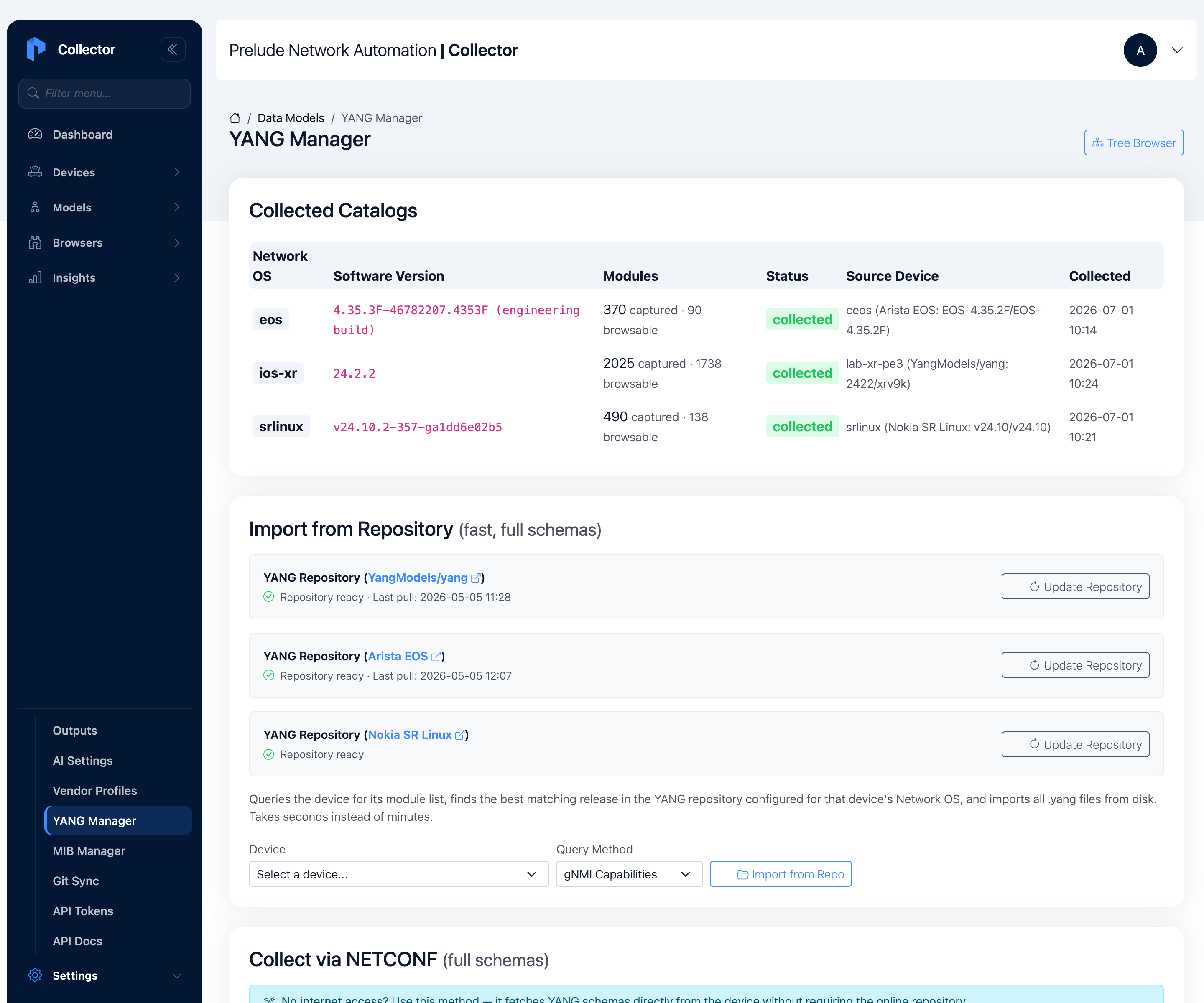
A catalog gets filled two ways:
- Import from a repository. The collector asks the device for its module list over gNMI capabilities or NETCONF, then pulls the matching full schemas from a YANG repository on disk.
- Collect over NETCONF. It reads the schemas straight off the box with
<get-schema>. No repository needed, so this works in an air-gapped network.
Either way, the catalog is the schema that a specific device serves, not a generic copy.
Once a catalog exists, you browse it as a tree. Pick a source and a module, and the collector renders the schema with the structure intact.
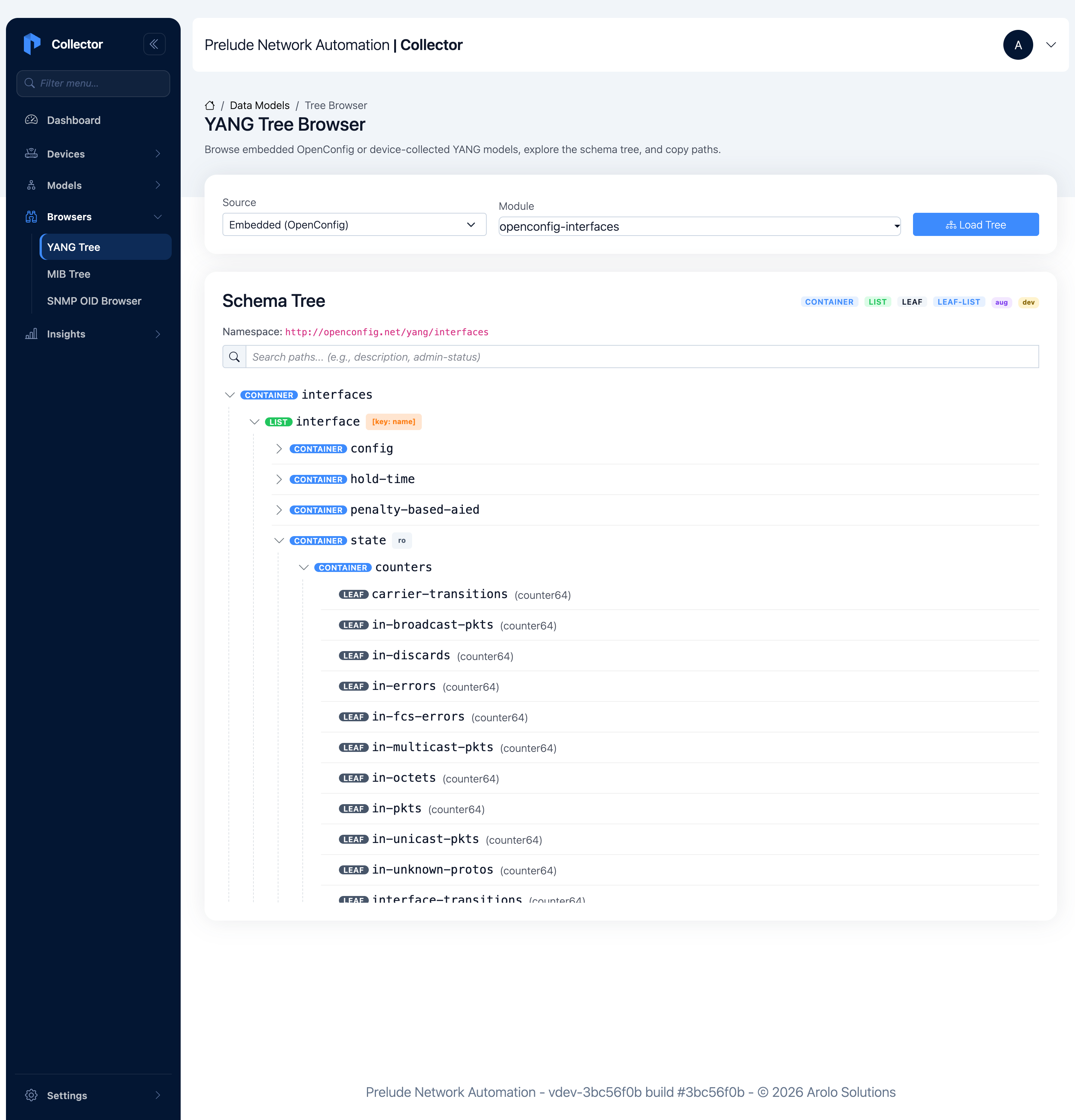
The tree tells you what you need to know before binding a path:
- The
interfacenode is a list keyed byname, so the path needs a key. - The
statecontainer is marked read-only. That is the operational data you collect, as opposed to theconfigyou would set. - Every leaf carries its YANG type.
in-octetsis acounter64, so you know it needs arate()downstream.oper-statusis an enumeration, so its values areUPandDOWN, not numbers.
Search by name when you don't want to scroll: type oper-status and the tree collapses to the matching leaves, each shown in its full path.
The device-collected catalogs are where this earns its keep. Browse an Arista EOS box's openconfig-interfaces and the interface list fills with the pieces that box actually adds: OpenConfig augmentations like ethernet and aggregation, and Arista-native ones like arista-varp and arista-vxlan.
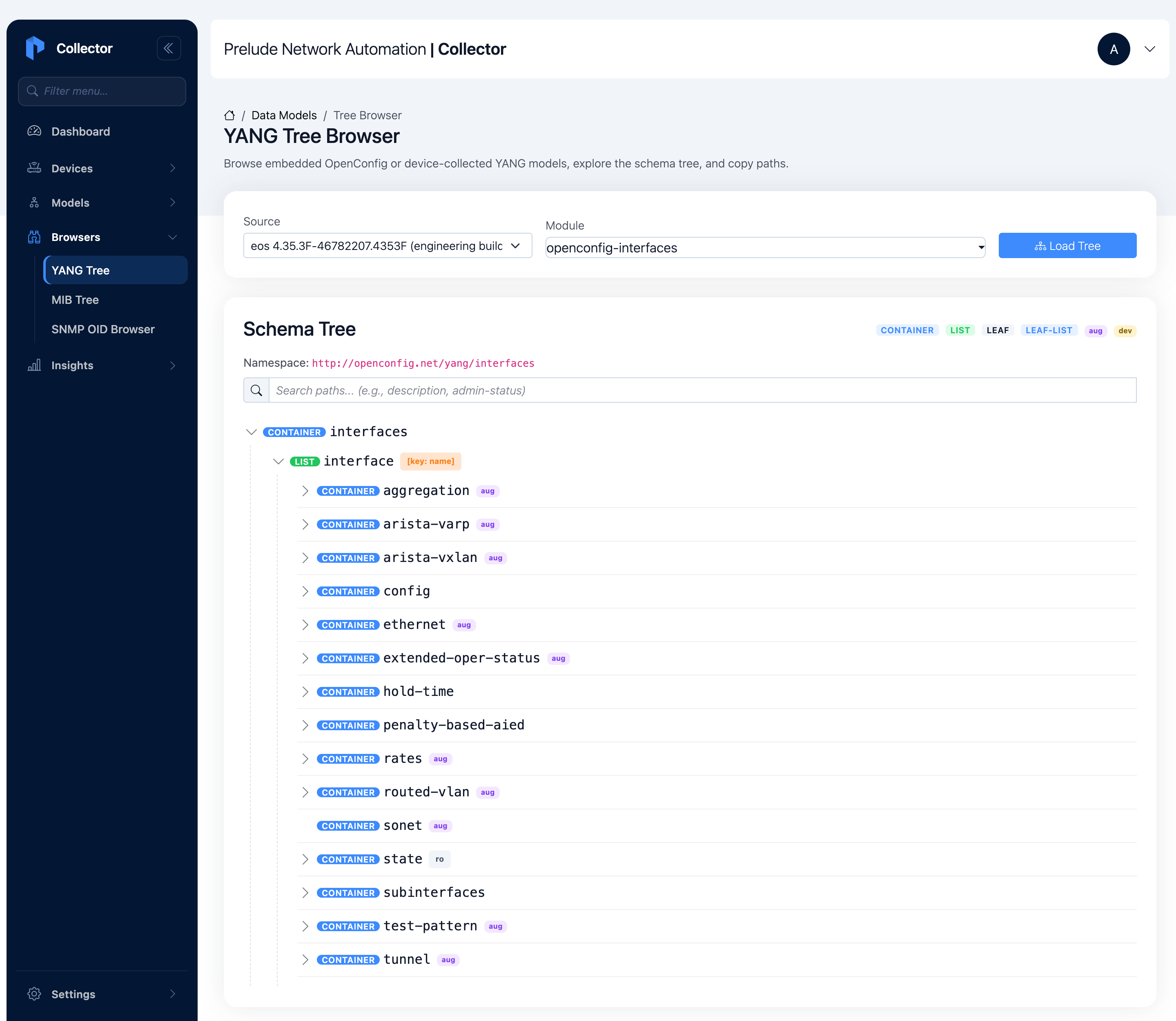
Where a platform augments or deviates from a standard module, the browser marks those nodes with an aug or dev badge, so you can see exactly where that box departs from the baseline. That is the difference between a generic OpenConfig checkout and the schema the device actually answers with.
The MIB manager: OIDs, resolved both ways
SNMP has the same problem in a different language. An OID like 1.3.6.1.2.1.2.2.1.8 carries no meaning on its own. You need the MIB that defines it to know it is ifOperStatus, that it reads up or down, and that the trailing number is an interface index.
The collector loads the IETF standard MIBs into the binary and lets you upload vendor MIBs on top. Vendor OIDs are not in the IETF set, so until the matching MIB is loaded, a walk that hits them comes back as raw numbers. Upload the .mib or .my file and it loads into the resolver immediately.
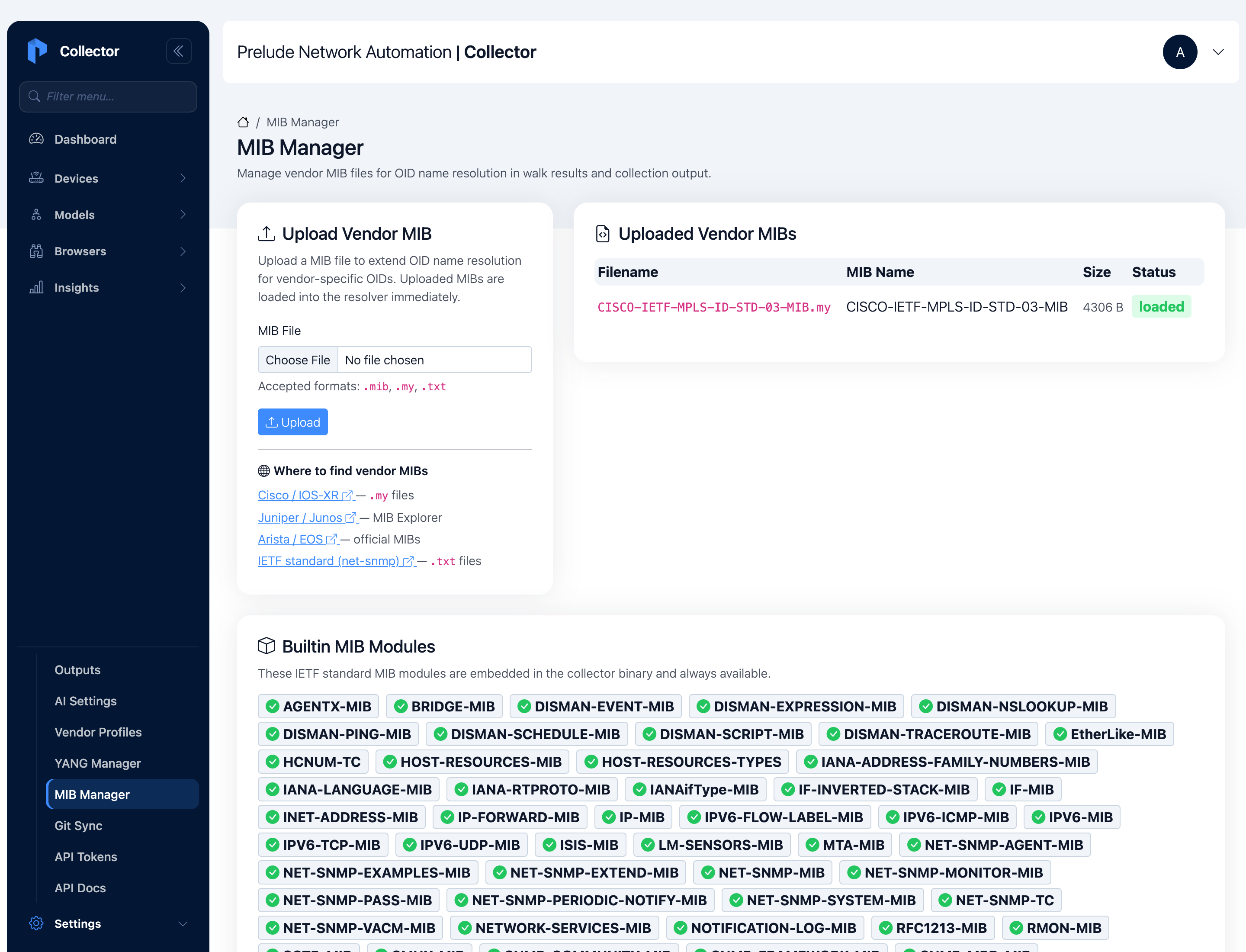
With the MIBs loaded, you browse the OID tree the same way you browse YANG. The collector tags each node by its SMI role, and the roles are the whole point of SNMP's table model.
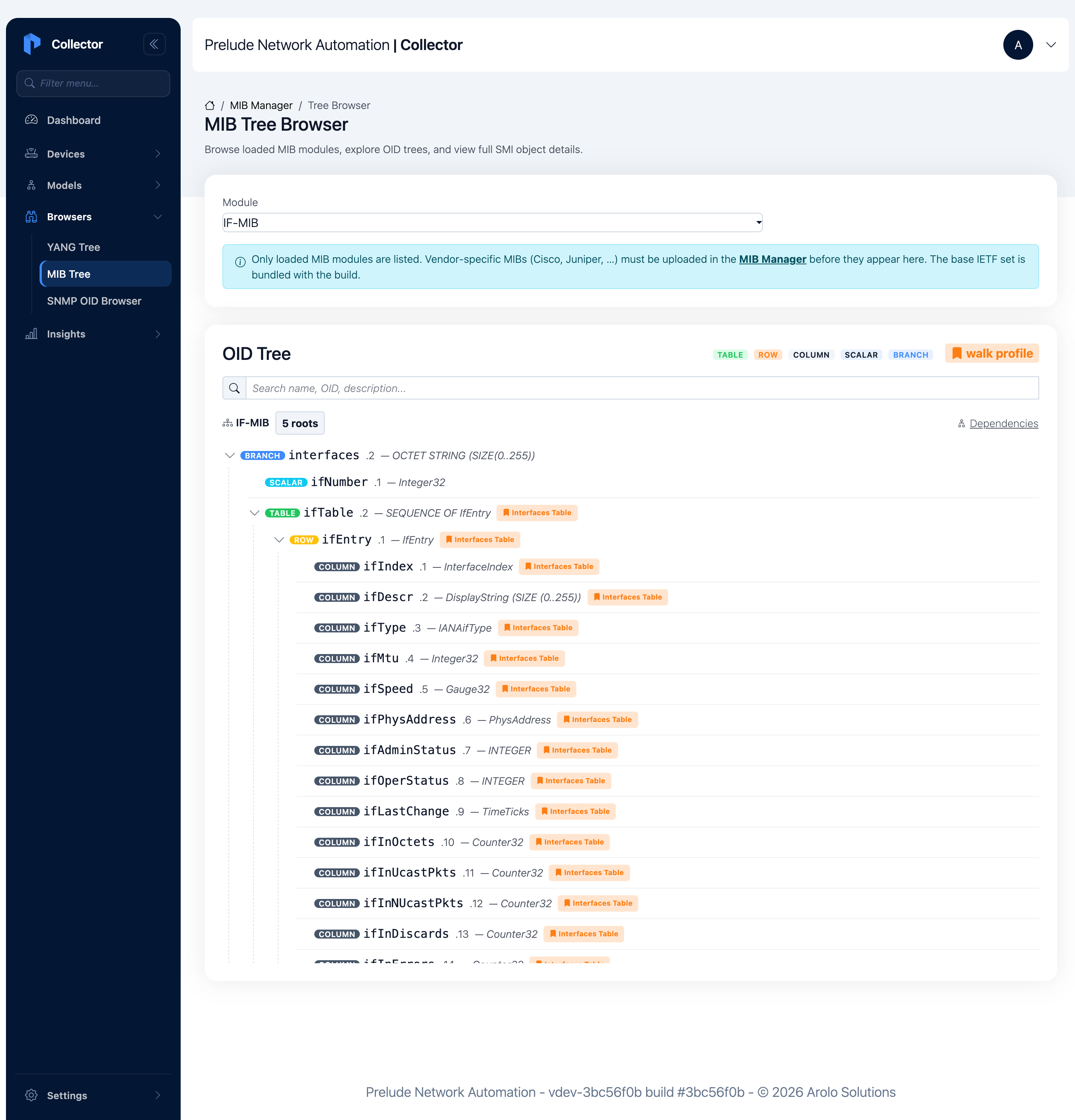
- A scalar like
ifNumberyou GET directly. - A table like
ifTableholds rows. - The row
ifEntryholds columns and declares the index. - Columns like
ifDescrandifOperStatushave one value per row.
Click any object and you get its full SMI record: the OID, the syntax, the max-access, and the status. You learn that ifOperStatus is an INTEGER enumeration, read-only, and current, before you ever put it in a mapping.
Then there is the part a static MIB file can't give you: what the device returns right now. Point the OID browser at a device, walk a subtree, and the collector resolves every numeric OID back to its name as it goes.
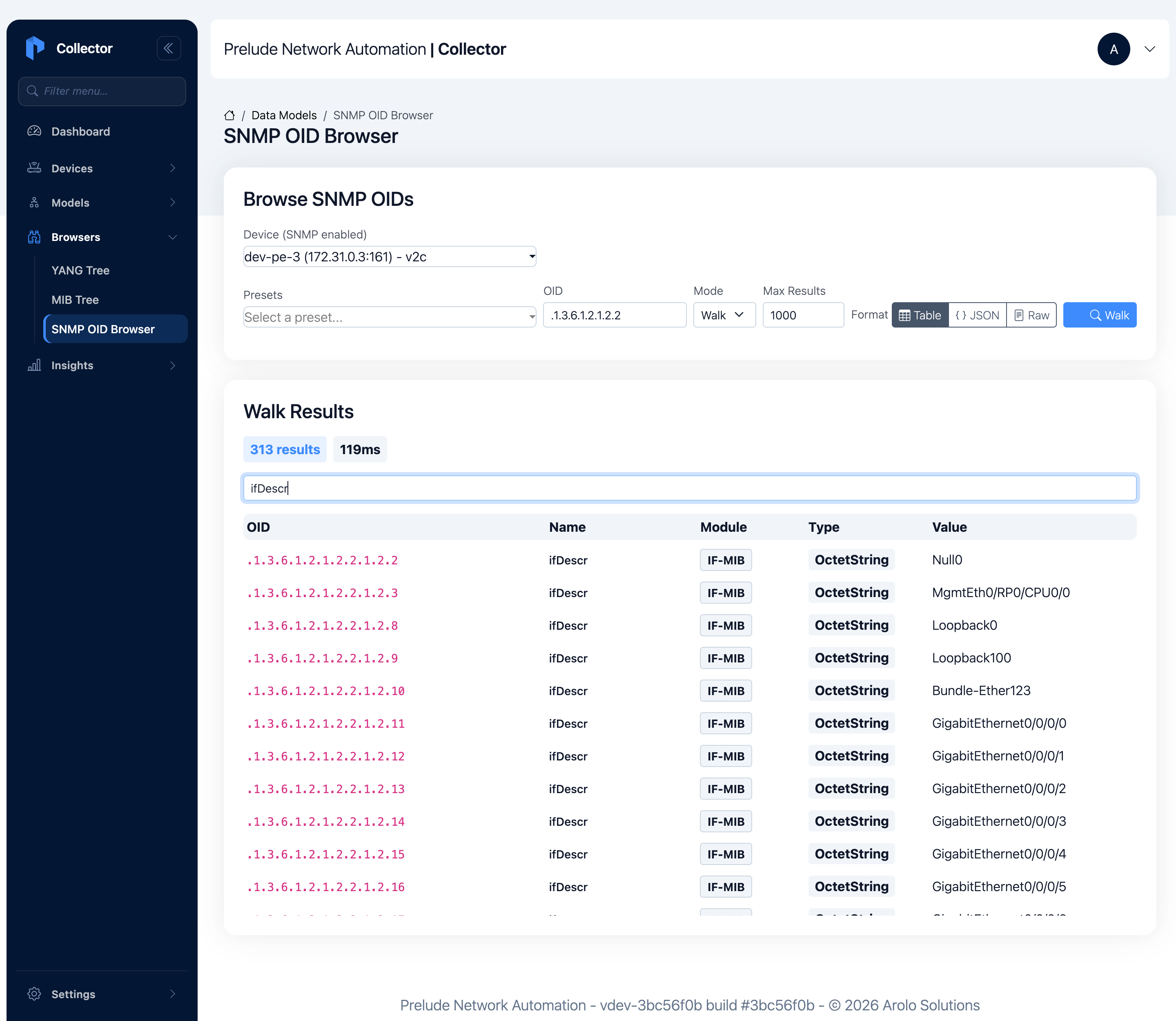
Three hundred results in about a hundred milliseconds, and every row reads as a name, not a number. The resolver also handles the table index: it strips the trailing instance number to match the column definition, so ...2.2.1.2.11 resolves to ifDescr with the value GigabitEthernet0/0/0/0. You are reading the device's real interfaces, named, against the live box.
Why this is step zero, not a side quest
Browsing the schema looks like a lookup tool. It is really the front of the collection pipeline. The path you find in the YANG tree and the OID you find in the MIB tree are the same paths and OIDs you bind in a Model mapping. We wrote about that mapping step before, in normalizing multivendor interface counters into one Grafana dashboard: one model, one mapping per vendor, the vendor difference absorbed at collection time.
That post assumed you already knew which paths to bind. This is how you find them. You browse the schema the device actually serves, read the type so you know whether it is a counter or an enum, confirm a live walk returns real data, and only then write the mapping. The unglamorous first step done well is what keeps the rest of the pipeline from failing quietly later.
It also keeps the knowledge in one place. The schema browser, the device, the mapping, and the output all live in the same collector. You are not reconciling a laptop checkout against a production box. You are reading the box.
Try it on your own network
Both browsers run in the collector's web UI, and the full step-by-step lives in two tutorials:
- Browse the YANG tree, load OpenConfig and device-collected catalogs, read node types and keys, search by name, and collect a device's own schema over gNMI or NETCONF.
- Browse the SNMP MIB tree, navigate the OID tree, read SMI syntax and access, upload a vendor MIB, and run a live walk that resolves OIDs back to names.
Prelude Collector is free for up to 20 devices. A single docker compose up -d and you're collecting. If you want to point it at your own boxes and see your real schema in the tree, reach out for a demo.