

Setting up a collection is a sequence of small, exact steps. You already know the result you want: normalized interface state from an Arista box and a Nokia box, in one shape, ready for Grafana. Getting there is the mechanical part.
You find the paths each vendor serves. You create a model with vendor-neutral fields. You write one mapping per vendor. You normalize the values, so UP and enable end up as the same thing. You test against the live device. You subscribe. You wire the output.
We covered those steps before: finding the path the device actually serves, and normalizing several vendors into one model. Every step is doable on its own. Together they are a lot of context-switching: browsing YANG trees and SNMP MIBs, parsing CLI output, and getting the mapping JSON exactly right.
So here is the next step: describe the result you want, and have an AI agent carry out those steps for you, while you approve each decision.
The collector already speaks API
Everything the collector does, it does over one REST API. There are three ways to reach it: the web UI for people, the API directly for your applications and scripts, and Prelude MCP for AI agents.
Prelude MCP is a separate, stateless service that puts that same API in front of an AI agent over the Model Context Protocol, the open standard that connects AI tools to real systems. Connect a client once, and the agent can list devices, browse YANG and SNMP, create a model, write mappings, run a live test, and start a subscription. It goes through the same API as the UI, so the agent can only do what you could do by hand. There is no new state to manage.
Seventeen of those tools are for the collector alone. The rest cover the other Prelude components, and stay off until you enable them.
Connect it once
The MCP server runs next to the collector and points at it with two environment variables:
docker run -d --name prelude-mcp -p 4040:4040 \
  -e PRELUDE_COLLECTOR_URL=https://collector.example.com \
  -e PRELUDE_COLLECTOR_ENABLED=true \
  registry.arolo-solutions.com/prelude/prelude-mcp:latest serve
Then point your agent at it. Any MCP client connects the same way. In Claude Code, for example, it is one command:
claude mcp add --transport sse prelude http://localhost:4040/sse --header "X-Collector-Token: <your-collector-token>"
The token is a collector API token. The MCP server never stores it. It forwards it on each request with a per-request X-Collector-Token header, so the collector stays the single place that grants and revokes access. The full walkthrough, and the config for other MCP clients, is in the docs: install the Prelude MCP server.
That is the whole setup. From here you talk to the collector in plain language.
What it looks like
Take the multivendor model from the earlier post: one interface-state model, one mapping for Arista, one for Nokia. You ask for it in a sentence, but building it is not one shot. It takes a few passes: a path returns nothing, an enum needs a transform, a field comes back misnamed. The agent adjusts and re-tests until the compare is clean. Below is a real conversation, from the request to a live subscription.
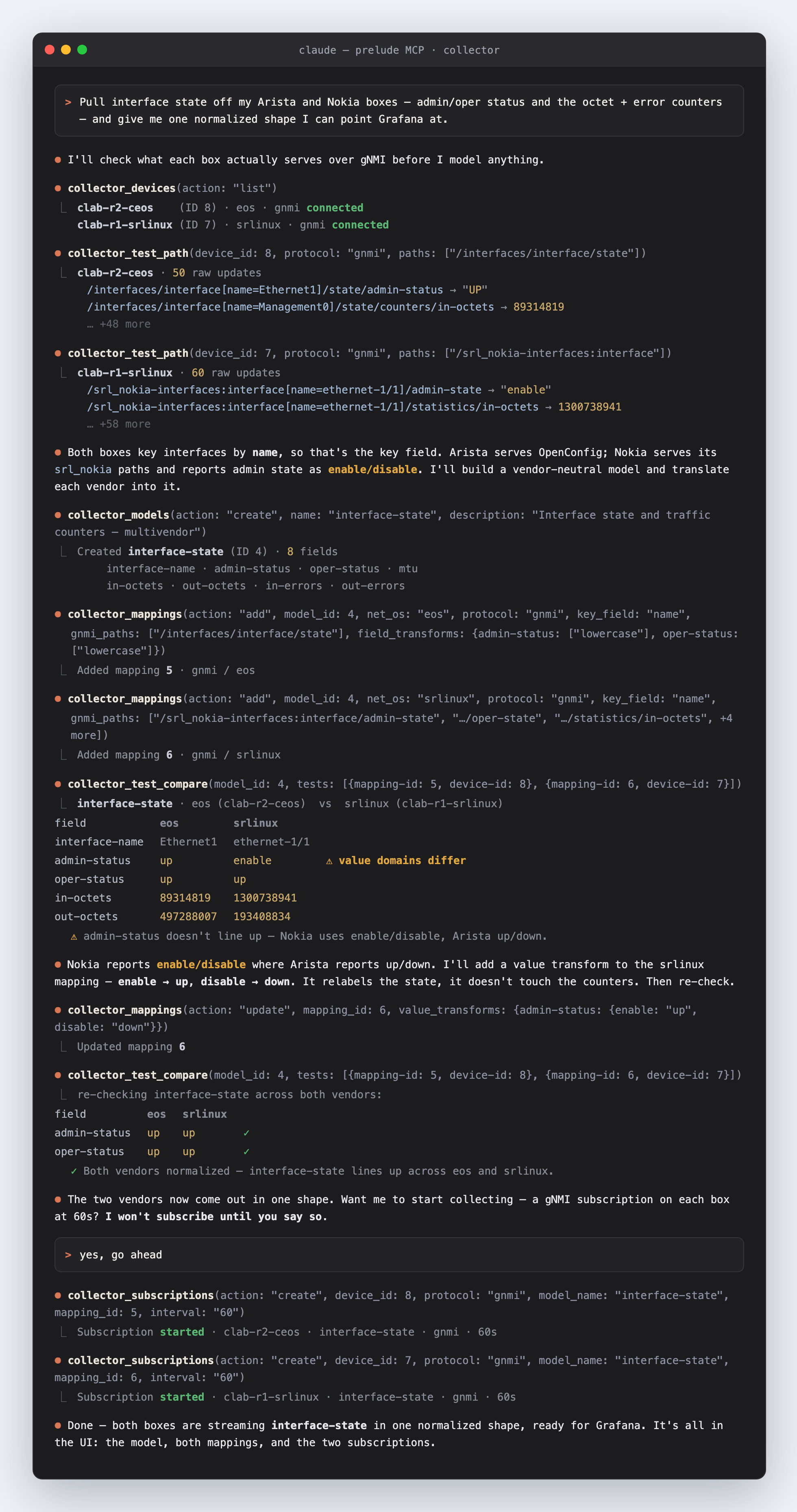
Read what the agent did, because every step is a tool you could have called yourself:
- It discovered the key field from real data, not a guess.
collector_test_pathreturns the raw gNMI from each box, so the agent picksnamebecause that is what the device actually returns. - It built the model and both mappings with vendor-neutral field names, one translation per vendor.
- It stopped at the comparison.
collector_test_compareruns both mappings against the live devices and lines the fields up, one vendor next to the other. Nokia reportedenable/disable; the agent normalized it toup/down, then showed you and waited. - It subscribed only after you agreed. No collection started until you said yes.
That last point is the one that matters.
You keep the decisions
The agent did the mechanical work: browsing the YANG tree or the MIB, parsing the CLI, the exact JSON, the per-vendor path differences that are easy to get wrong. It did them quickly.
It did not decide anything that was yours to decide. Which fields belong in the model. Whether the normalized values are correct. Whether the two vendors truly line up. When to start collecting. Those stayed with you. The agent proposed, showed its work, and waited for a yes.
That boundary is deliberate. An agent that silently reconfigured your collection would be a liability, not a help. This one removes the tedious part and leaves the judgment with the engineer who owns the network.
And because every call goes through the same collector API, nothing the agent does is hidden:
- The model it created is in the Models page.
- The subscription is in the UI.
- If the comparison looks wrong, you edit the mapping and run it again, or you remove it.
You are not trusting a process you cannot see. You are handing an assistant the painful work.
What makes the agent good at this
Willing is not the same as good. Two things make the difference, and both are open source.
- The companion skill.
prelude-mcp-companionwalks the agent down the same path as the web UI, all inside the collector: add the device, define the model and its fields, write one mapping per vendor, test, then subscribe. It also carries the conventions a Prelude engineer already knows: how the mapping JSON is encoded, the forty-plus built-in transforms, how to find a key field, and the rule that matters most here, compare across vendors before you subscribe. Without it, an agent guesses. With it, it follows the method. - The playground. A repository of import-ready example models, transforms, and vendor profiles. The
interface-statemodel from the last post is in there, next to OpenConfig BGP, IS-IS adjacencies, an SNMP IF-MIB walk, and a CLI template. The agent imports one and adapts it, instead of starting from an empty model.
Both live at github.com/Arolo-Solutions/prelude-collector-playground. Clone it, point the agent at it, and the first model is ready to import.
Try it on your own network
You need three things, and all three are a few minutes of setup:
- The collector, running: a single
docker compose up -d. - The MCP server, connected to it and to your agent, per the install guide.
- The playground and the companion skill, from the repository, so the agent knows the conventions.
Then ask for the telemetry you want, and check the agent's work before it collects.
Prelude Collector is free for up to 20 devices. If you want to point an agent at your own boxes and see one normalized shape come out, reach out for a demo.